Windows UI automation · Desktop toolkit
Deskrun
Automate real Windows desktop applications through their user interface. Deterministic runs verify each step and report the results with screenshots, JSON run logs and JUnit XML, entirely on your own machines.
QA engineers and automation developers on Windows
Drive real Windows apps, check what happened, and report it to CI.
Product accessRequest an evaluation build
Inside Deskrun
Screenshots use sample data. Select an image to see it at full size.
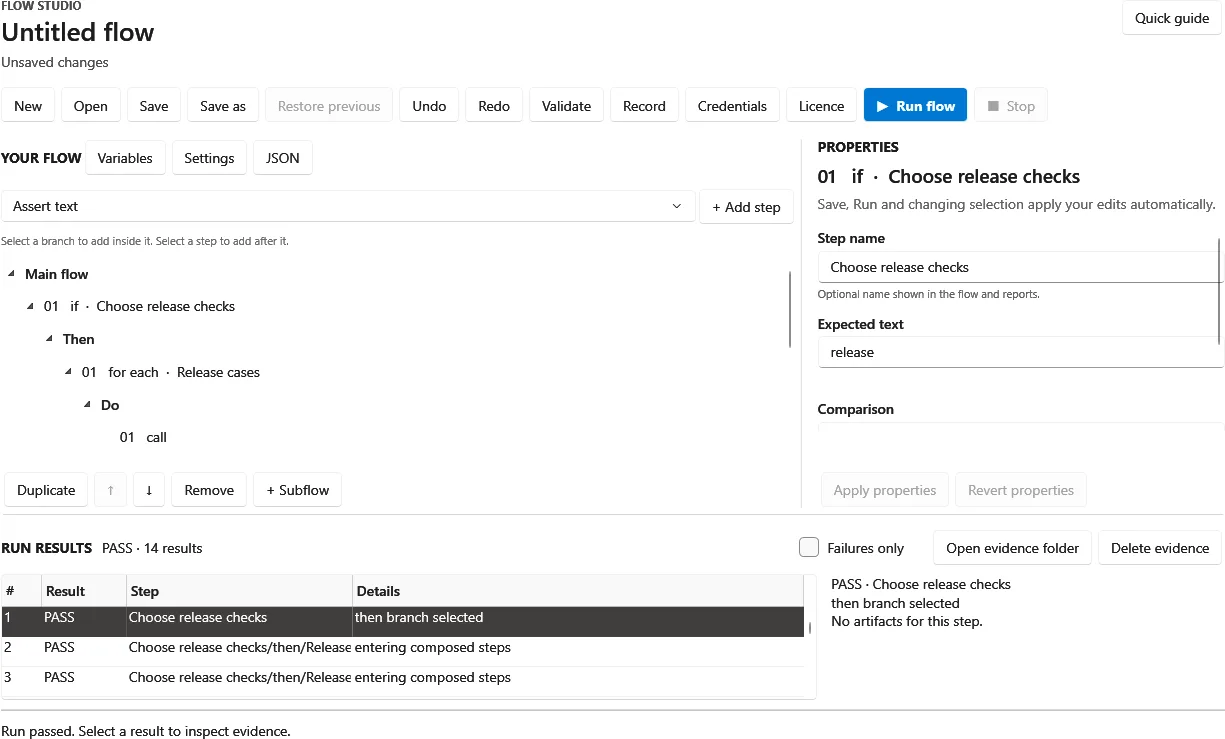
Build and run flows in Flow Studio
Compose steps with branches and loops, edit each step's properties, and review every result after a run.
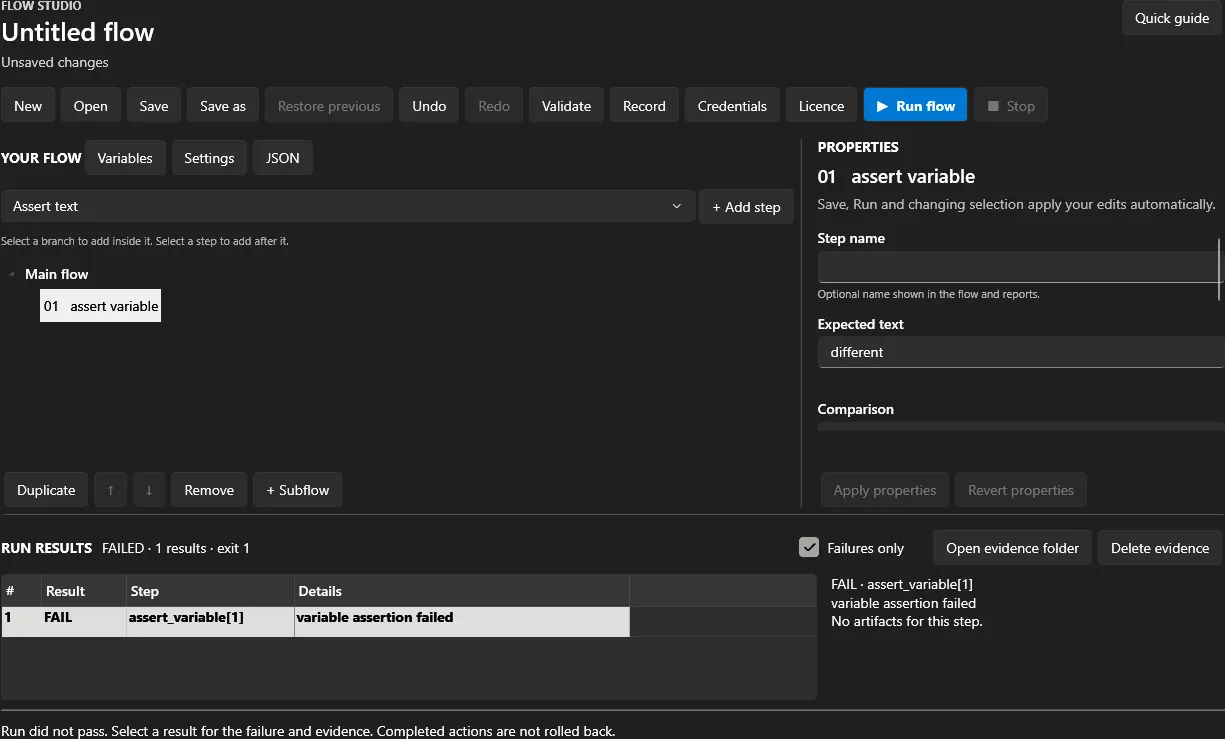
See why a run failed
Filter the results to failures, open the failed step's details and exit code, and go to its evidence folder.
Who it is for
QA engineers and developers who automate, check and report on Windows desktop applications, whether they watch a run or leave it to CI.
What it does
- Flow Studio editor with recording, target picking and run evidence
- CLI and QA runners with JUnit XML and CI exit codes
- C SDK with Python and .NET bindings
Drive Windows desktop applications through their user interface, verify the results, and report them to people and CI systems.
Before you start
Where you will work
Deskrun runs on Windows (x64) on your own machines, with no account or licence server. Ask us for an evaluation build; the 30-day evaluation for internal, non-production use starts on first use.
Prepare your records
Flows are JSON files. Prepare a test copy of the application you want to automate and the steps a person follows today. Store passwords in Windows Credential Manager rather than in flows; recorded typing is saved as a placeholder, not plain text.
Your first steps
- Request an evaluation build and install it on a Windows test machine.
- Record or build a flow in Flow Studio against a test copy of your application, and add assertions.
- Run it with deskrun-qa in a test pipeline and review the JUnit XML, screenshots and run log before running anything unattended.
See a workflow in action
Record, check and report a flow against a Windows app with an evaluation build.
- Record a few steps in Flow Studio against a test copy of a Windows application, picking the target for each step.
- Add an assertion, run the flow and review each step's result, screenshots and run log.
- Run the same flow with deskrun-qa and check the JUnit XML report and exit code a CI pipeline would receive.
Use this workflow to assess fit, then review the plan, access terms and onboarding for your team.
View Deskrun demo availabilityCompare plans
Deskrun pricing
Yearly subscriptions only, per Studio seat and per runner. Online purchase is coming soon. Contact us to confirm access and the total price before payment.
Flow authors
Studio seat
US$240per seat / year
USD · tax depends on your country
Plan includes
One named person who authors or records flows
- Flow Studio: editing, recording, target picking and run evidence
- Signed licence file checked offline, with no licence server
Unattended runs
Runner
US$480per runner / year
USD · tax depends on your country
Plan includes
One machine or container running flows unattended
- Unattended runs through the deskrun CLI, the deskrun-qa runner or the SDK
- JUnit XML, CI exit codes, screenshots and JSON run logs
What to know before choosing
Buy a Studio seat for each person who authors or records flows and a runner for each machine or container that runs flows unattended. Seat and runner counts are contractual, not tied to a device. A 30-day evaluation for internal, non-production use starts on first use. Deskrun runs on Windows (x64) only.
Need more capacity? Discuss larger capacity and agree on a supported allowance before exceeding a limit. We do not charge automatic overage fees. Each product has its own plan.
Delivery and access
Online purchase is coming soon; until then, contact us for an evaluation build or a written offer. Each paid licence is a signed file checked offline, and each yearly renewal issues a new licence file from your account page.
Prices are in US dollars and exclude tax. Any applicable tax is added at checkout, and your order summary confirms the total. Your bank may charge for currency conversion.
Your order summary identifies the seller and confirms availability in your country.
Questions about Deskrun
How does Deskrun find and drive application controls?
Deskrun targets elements through Windows UI Automation, falling back to MSAA, coordinates, pixel checks or on-screen images, with optional local OCR. Runs are deterministic and seeded, and each run records screenshots and a JSON run log. Try your own applications during the evaluation before relying on a flow.
How does Deskrun fit into CI?
The deskrun-qa runner turns a flow's assertions into JUnit XML and CI exit codes, so a pipeline can pass or fail on the result. The deskrun CLI runs, records and inspects JSON flows and manages credentials, and deskrun-sdk.dll offers a C interface with Python and .NET bindings for your own code.
Does Deskrun send our data or credentials anywhere?
No. Deskrun runs entirely on your machines, with no telemetry and no licence server; licences are signed files checked offline. Recorded typing is saved in the flow as a Windows Credential Manager placeholder, never as plain text.
How is Deskrun licensed?
By yearly subscription: US$240 per Studio seat, for one named person who authors or records flows, and US$480 per runner, for one machine or container running flows unattended. Prices exclude tax. Each renewal issues a new signed licence file. A 30-day evaluation for internal, non-production use starts on first use.
Running automation safely
Deskrun clicks and types in real applications. Review and test every flow before running it, especially unattended, start against test copies of your applications, and automate only systems you are authorized to use. Keep screenshots and logs that may contain personal information under your organization's control.
Software and service scope
Deskrun is licensed by yearly subscription: a Studio seat for each named person who authors or records flows, and a runner for each machine or container that runs flows unattended through the CLI, QA runner or SDK. Seat and runner counts are contractual, not tied to a device. Each renewal issues a new signed licence file from your account page. Online purchase is coming soon; contact us for an evaluation build or a written offer.